Add Unit
Info
Not available to all users
To add a unit, click the "Add new" button.

After clicking the button, a form will open in a pop-up. Here, you can enter the unit's information.
Fields in the "Add Unit" Form
The form consists of the following fields:
- Building Number: Enter the building number where the unit is located.
- Apartment Number: Provide the apartment or unit number.
- No. of Bedrooms: Specify the number of bedrooms in the unit.
- No. of Bathrooms: Enter the number of bathrooms.
- Floor Area (sq. ft.): Indicate the unit’s total floor area in square feet.
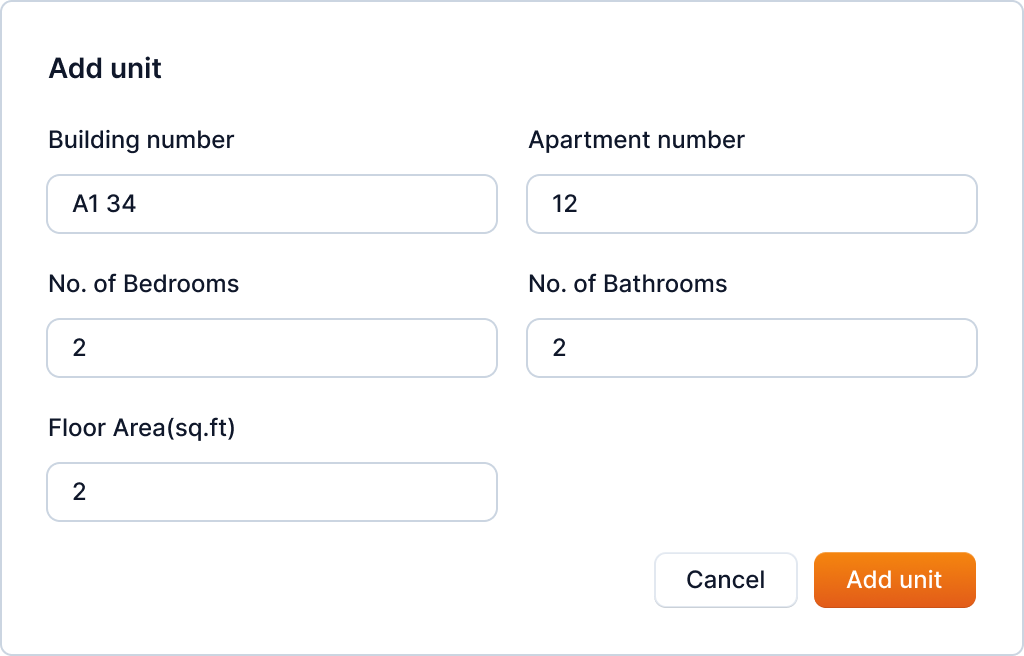
After filling in the necessary information, click the "Add unit" button. This will add the unit to the property.
Tip
You can also add units in bulk. Refer to Unit Bulk Upload for more information.